The right pack, in perspective.
Brand and quantity normalization help separate a good match from a similarly named product. Always check the original listing.
SELF-HOSTED. YOUR OWN ADVANTAGE.
COMPARE / TRACK / WATCHCompare local prices across four marketplaces. Find the matching pack, then let the next price drop come to you.
Your location. Your watchlist. Your own instance.

Actual app. Example prices. Your delivery location makes the difference.
YOUR REGULAR STORES.
A SINGLE POINT OF VIEW.
 Zepto
Zepto Blinkit
 Flipkart / Minutes
 Swiggy Instamart
Independent integrations.
No marketplace affiliation.
A CLEARER WAY TO SHOP
Three simple moves.
A lot fewer open tabs.
01 / GET THE WHOLE PICTURE
Bring Zepto, Blinkit, Flipkart and Swiggy Instamart into one search. Select a matching product and compare vendor offers without losing the details.
02 / FIND THE EXACT ONE
Paste a specific product link alongside your search. Keep the item in view when it disappears from search, then create a listing alert for its return.
03 / LET THE PRICE COME TO YOU
A target price, a percentage drop, or a restock. Set the condition once and let your background worker check on schedule.

THE DETAILS MAKE THE DIFFERENCE
A similar name isn’t always the same product.
ShopLense looks at brand, name and quantity
before bringing listings together.
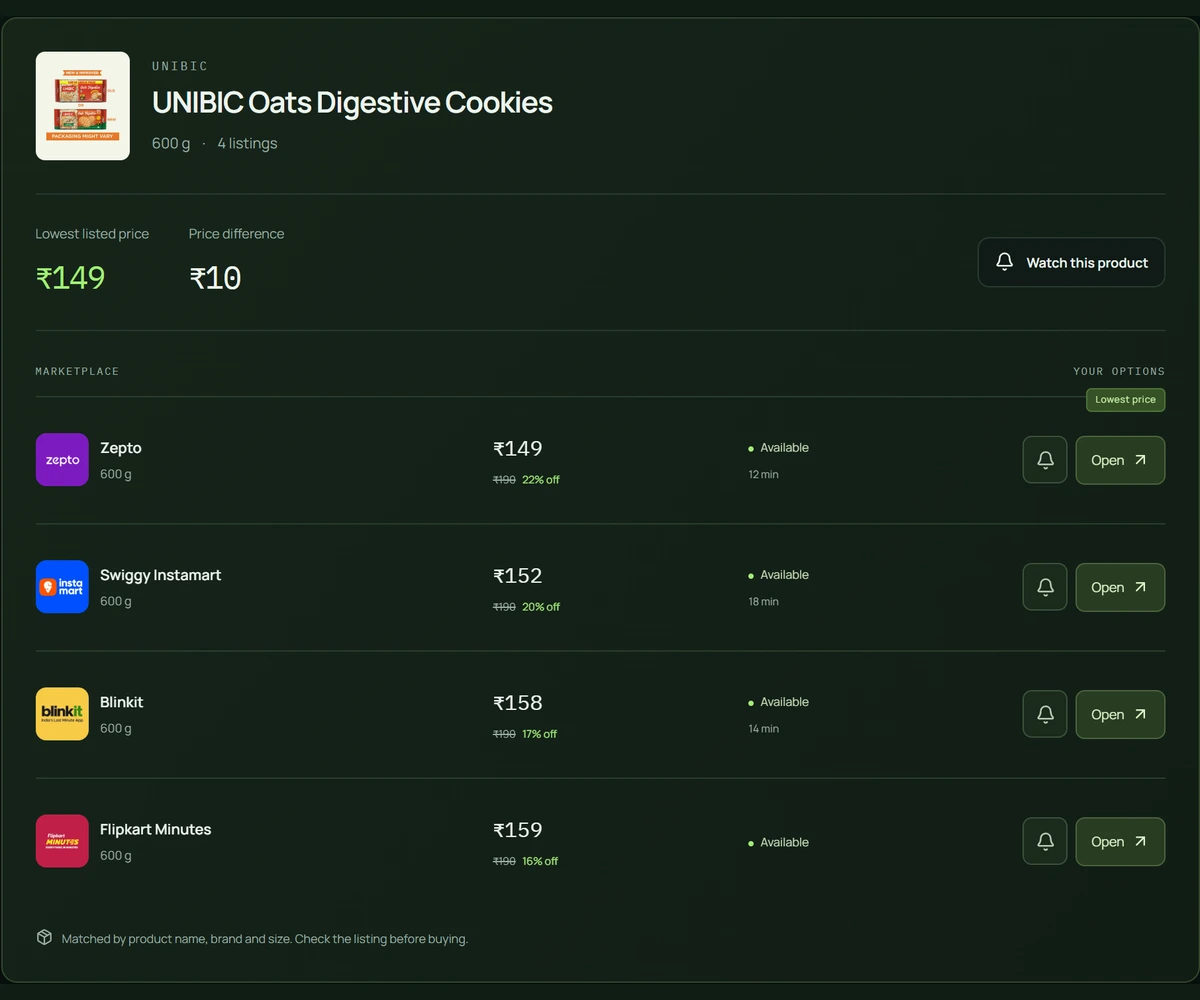
Actual comparison view. Illustrative prices.
Brand and quantity normalization help separate a good match from a similarly named product. Always check the original listing.
Offer price, MRP discount, availability and delivery estimates stay together where vendors provide them.
Rank by relevance, lowest price, discount amount, discount percentage or vendor count. Keep required search words in the mix.
NEARBY IS WHAT MATTERS
Local stock follows your delivery area. Set coordinates and pincode, and align your saved vendor sessions before comparing.
Zepto and Blinkit use coordinates. Flipkart uses your pincode. Swiggy follows its saved browser-session location.
Flipkart Minutes-only mode excludes regular marketplace fallback and carries through to saved alerts. Address setup can affect availability.
Vendor failures appear separately. Successful comparisons stay available when another integration cannot return results.
A LITTLE LESS MANUAL CHECKING
Find your product, choose a rule, and leave the worker running. ShopLense checks on schedule and sends the news when your condition matches.
Target price or lowest-vendor threshold.
A percentage drop from the baseline.
Listing-level restock reminders.
Browser push or ntfy. Your choice.
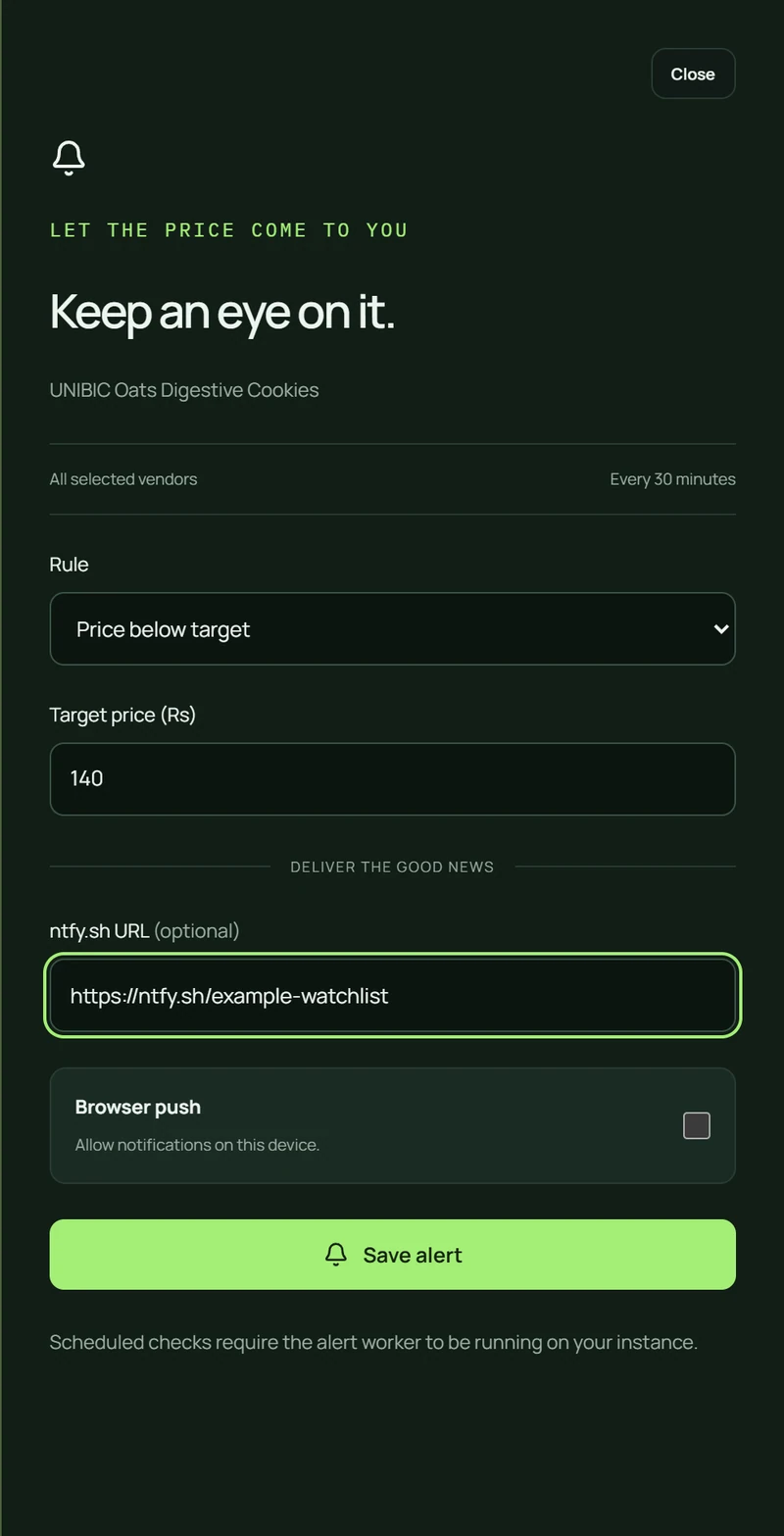 YOUR RULE. YOUR INSTANCE. YOUR SCHEDULE.
SIMPLE ON PURPOSE
Align coordinates, pincode and delivery sessions.
Choose marketplaces and a product you need.
Open a vendor listing or save a price/restock rule.
A CLEAR CHOICE
Self-host the complete workspace today.
Managed hosting and a hosted API are coming next.
The full workspace, on your infrastructure.
Hosting, database and notification costs are yours.
Vendor access depends on location and network.
A managed home for your comparisons and watchlist. Paid hosting is planned; pricing will be announced.
LESS SETUP. THE SAME CLEAR VIEW.A supported hosted API for your own integrations. Access, capabilities and pricing will follow.
BUILD ON A CLEARER PICTURE.YOUR INFRASTRUCTURE. YOUR INSTANCE.
Bring Node.js 22, Postgres, and a delivery location.
The installation guide takes you through the rest.
# Get the source
git clone https://github.com/DebadityaHait/ShopLense.git
cd ShopLense

# Install and configure
npm ci
cp .env.example .env
Next: configure your environment, apply migrations, and set up vendor sessions. Run the app and alert worker separately.
Individual product listings across Zepto, Blinkit, Flipkart and Swiggy Instamart. It groups comparable brands and pack sizes, then shows offer prices, MRP discounts, stock and delivery information where vendors provide it. It does not place orders or calculate a combined basket checkout.
This website introduces the product. To use the comparison workspace, clone the repository and run your own instance. A managed hosted version is planned, but is not available yet.
Local inventory and prices can differ by location. Zepto and Blinkit use coordinates, Flipkart uses a pincode, and Swiggy follows its saved browser-session location. Configure these for the same delivery area before comparing.
Node.js 22, a Postgres database, and the environment settings described in the installation guide. Browser-assisted vendor integrations need Chrome and configured delivery sessions. The alert worker runs as a separate process. Hosting, database and notification infrastructure may have their own costs.
Create an alert for a matched group or a specific vendor listing. Choose a target price, a lowest-vendor threshold, a percentage drop or a back-in-stock reminder. A separate worker repeats checks on schedule and sends browser push or ntfy notifications when a rule matches.
Vendor sessions, delivery coverage and network restrictions affect results. ShopLense reports vendor failures separately and keeps successful results visible. Flipkart Minutes-only mode is implemented, but the currently documented direct-HTTP flow can encounter an address gate. Check availability from your intended host.
The self-hosted application has internal endpoints for its own UI. A supported hosted developer API is planned and marked coming soon; there is no public API subscription or API key service on this website.